Showing posts with label link. Show all posts

Thursday, October 26, 2006

Popup menus - Flickr vs. Google

A few weeks ago Google quietly opened up SearchMash.com.

While SearchMash is not branded with the Google brand, the fact that it is being operated by Google was quickly revealed and widely discussed:

(The lack of branding was explained by Google as an attempt to gather more objective data about user response to new interfaces).

The most surprising change for me was the behavior of the green link:

Screenshot: Google SearchMash search results
Since it looks like a link, and smells like a link, you'd probably expect it to - duh - behave like a link, and take you to the web page it points to.

This is not the case in SearchMash though. When you click on the green link, you get a *gasp* popup menu with options:
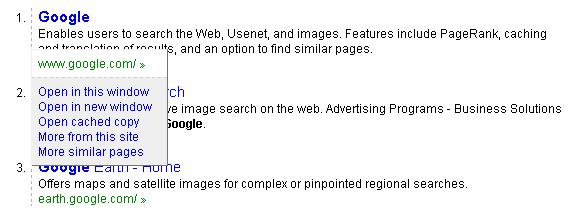
It's interesting to compare this to the approach taken by Flickr in their recent user interface revamp.

Looking at the menu toolbar on the top of the Flickr page, you'll notice a list of links, and a small arrow next to each one of them:

Now, it's interesting to note that unlike the Google interface, which sacrifices old habits to provide richer functionality, the Flickr menu manages to provide the richer functionality while retaining the class link semantics and behavior.

When you click the arrow, a drop-down popup menu opens up with a list of options:
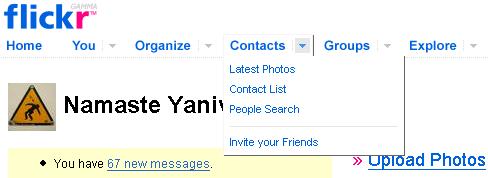
Which is great. But, if you didn't notice the arrow, or you don't understand what is it supposed to do, you can simply click the link:

What's really nice though, is that once you click the link, you get the Latest Photos page - but you also get the same list of links which were in the popup menu listed at the top row of this page, so you're still able to navigate to them.

I find the Flickr choice of user interface a much better balance between retaining compatibility with existing habits and known metaphors, and providing new functionality.

Thursday, August 17, 2006

Google search results - link tracking costs 90 Gigabytes / day

I spent a few minutes, together with Eran, looking at the method that Google uses to track which links are clicked in the Google search results page. I figured they must be doing this, since it sounds like an essential bit of information, and of course they do that.

The mechanics are simple, and very well implemented - the generated links in the search results have a onmousedown JavaScript function (named clk) attached to them. When a link is clicked this JavaScript bit is run. Essentially what it does is use the JavaScript Image object (one of the oldest tricks in the JavaScript "book") to send a request to the Google web site, with the clicked link information:

function clk(url,oi,cad,ct,cd,sg) {
...
new Image().src="/url?sa=T"+oi_param+cad_param+"&ct="+e(ct)+"&cd="+e(cd)+u+"&ei=jwbkRLWWGYfa2wKN1uRj"+sg;
}

I was surprised though to find in that otherwise-sparkling-clean Google implementation a bunch of additional JavaScript functions which appears to be never used, like:

function ss(w,id){window.status=w;return true;}
function cs(){window.status='';} var bdg = 0;
function sb() {bdg = 1;}
function ga(o,e)
{
...
}
function anbc(id)
{
...
}

A quick count of the bits shows that the unused JavaScript code amounts to about 1K in size, per search results page. Assuming 91 million searches per day, this means unnecessary waste of 80-90 Gigabytes (depending on how you count MB - the right way or the Western Digital way :) ) of bandwidth, every day.

It's a good thing that bandwidth is so cheap. If Google was running on GoDaddy, they'd consumed their entire $10/month 500GB bandwidth limit in 6 days :)

And no, please don't count how much bandwidth we waste on unnecessary JS in the Yedda pages, I can tell you right away it's quite a bit. Functionality first, optimizations later!

Technorati : , , , , ,
Del.icio.us : , , , , ,