Tuesday, September 27, 2005

Semantics

That elusive quality that stands behind these seemingly random clusters of tags. If you stare at a cluster long enough, you might see the semanthic meaning peeking through it, sort of like the ghost image of a cat, showing through long after the cat strolled away.

Yes, this was just an excuse to post :)

Tagging tags

I like the classification system presented in "The Structure of Collaborative Tagging Systems" (Scott A. Golder and Bernardo A. Huberman,Information Dynamics Lab, HP Labs):

1. Identifying What (or Who) it is About.
Overwhelmingly, tags identify the topics of bookmarked items. These items include common nouns of many levels of specificity, as well as many proper nouns, in the case of content discussing people or organizations.

2. Identifying What it Is.
Tags can identify what kind of thing a bookmarked item is, in addition to what it is about. For example, article, blog and book.

3. Identifying Who Owns It.
Some bookmarks are tagged according to who owns or created the bookmarked content. Given the apparent popularity of weblogs among Delicious users, identifying content ownership can be particularly important.

4. Refining Categories.
Some tags do not seem to stand alone and, rather than establish categories themselves, refine or qualify existing categories. Numbers, especially round numbers (e.g. 25, 100), can perform this function.

5. Identifying Qualities or Characteristics.
Adjectives such as scary, funny, stupid, inspirational tag bookmarks according to the tagger’s opinion of the content.

6. Self Reference.
Tags beginning with “my,” like mystuff and mycomments identify content in terms of its relation to the tagger.

7. Task Organizing.
When collecting information related to performing a task, that information might be tagged according to that task, in order to group that information together. Examples include toread, jobsearch. Grouping task-related information can be an important part of organizing while performing a task (Jones et al. 2005).


While their system is Del.icio.us-specific, it is almost general enough to apply to many of the other tagging systems as well.

Such classifications can be important building blocks for making tagging more usable for the average joe, by leading them through the tagging process in a more guided, structured way.

Tagging UI suggestion - part 3

Last one in the series.

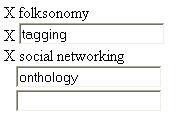
The tagging text turns (auto-magically of course) back into a text box, allowing you to edit it.

This UI might have a chance at encouraging people to use mutags without confusing the tagging database and without adding too much complexity, and, without having to know what is the tags seperator.

Good? bad? stinks? let me know what you think.

Tagging UI suggestion - part 2


Following the previous post.

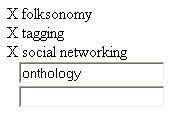
Once I enter the "onthology" tag, the result is:

In the next post, I will demonstrate what it looks like when I change my mind about the "tagging" tag, and would like to replace it with "tags" instead.

RawSugar tagging interface and mutags

The RawSugar tagging interface takes the following approach to tagging:

  • separator is comma, not space. So as long as you can remember this, mutags are fine. If you fail to remember this though (maybe because most of other tagging sites using spaces and not commas...), even single-word tags get messed up
  • You get a lot of help in typing the tags (choose from other people who tagged this tag, tag-completion)
  • Hierarchical tagging support. This may be slightly too optimistic about just how good people are at creating these hierarchies, but, like everything else related to folksonomy, we'll just have to wait and see if this works.

I like the auto-completion feature. The comma thing is great, but since RawSugar lives in a space-delimited tagging world, it's a bit of a problem. It's time for a de-facto standard, and I am voting for the comma-delimited one.

Proposal for an alternative tagging user interface follows.

This requires ajax, though it can be gracefully-degraded to work on non-Ajax systems as well.

The tagging interface would look like this:
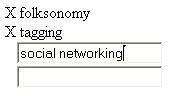
The user can use the X to delete the tag, or type the next tag (social networking). When the user is done typing "social networking" and moves to the next, empty text box, the following happens:

  • The text box containing "social networking" auto-magically turns into a regular text
  • A new empty text boxes is created following the empty one that I am about to type into

Once I type the new keyword, here is what it looks like:


Hmm. Due to blogger limitations, the next step in the UI will be in the next post.

toxic pizza saturated water

saturated water
saturated water,
originally uploaded by YanivG.
Here is a wonderful example of a multi-word tag (I mean, mtag :).

For reasons clear to anyone looking at it, this picture just had to be tagged with the incredibly useful and popular tag "toxic pizza".

This was my first experience with using a tag that no one else ever used to tag anything (a.k.a lonelytag. I am getting somewhat obsessive about inventing names for types of tags. Or, better phrased, about tagging tags :).

two words tags

Fine. We already gave up on a having a proper tag infospace architecture with lots of proper structure. But the least we could do is come up with a working, useable interface for two-words tags (while we're at it we may want to consider generelizing it into the so-much-more-complex challange of n-words tags).

Flickr and most of the other taggers go for the single text box for multiple tags approach, which has the advantage of being so easy to use that even moms could do it. This is perfect for single-word tags. Here they also allow multi-word tags, "this way", though I bet that a lot of single-word tags were created by mistake by people forgetting "to do this".

Through the rest of the Flickr interface the issue of multi-word tags is largely ignored, and they are converted into a single word by removing all spaces in most places. Duh.

del.icio.us actively ignores the whole thing by allowing only single word tags. This is not stated exlicitely in the UI, but you just can't do multi-word tags (someone please come up with a shorter name for this quick).

Technorati does allow and acknowledge multi-word tags (argghh!) when assigning tags, using a user interface of multiple smaller text boxes array in a 4x5 table. This is somewhat less elegant, takes a lot of screen realestate, and is still somewhat confusing.

Obviously, when using single tag entry text box, space cannot be used as a delimited between the words in a mutag (there you go. short name for multi-word tags just invented). If another user interface element is used, the problem becomes much more manageable (in fact, trivial).

Too bad, since a single tag entry text box does have its charm. I'd hate having to choose between doing proper mtag support and supporting a single tag entry text box. Can't we have both somehow?


Technorati : , ,
Del.icio.us : , ,